
Kingsqueak.ORG and KC2RGW.COM Amateur Radio, Technology, Rantings
Featured Articles
E-CigarettesKGUVD-1P Prog
PC Radio Headset
PSK-31 Basics
K2EPD Repeaters
Kingsqueak
About MeAmateur Radio
RACES
Photo Album
My Resume
Contact Me

Intro
Welcome to the home of Kingsqueak and KC2RGW. Here lies my postings and commentary on things involving my hobbies and work, covering amateur radio, technology and Linux and my general rantings and ramblings on anything that comes to mind.
News
I recently migrated to this new format. All the old articles still remain. If you are looking for articles, check the Pages/Articles or for posts, Posts/Archive. Once the site is re-indexed the search box will work better than it does right now.
Recent Posts
Understanding the basics of SSB transmission
(2012-09-28) The basic principles of operating a single sideband transmissionSome SSB transmitting fundamentals
For whatever reason there is always confusion over SSB operating. I noticed there weren’t very many articles around that did a decent job explaining what LSB and USB transmissions “look like” and too many operators just don’t understand why or how they are interfering with other stations or in the reverse, how to figure out which direction to go in to get away from another encroaching station.
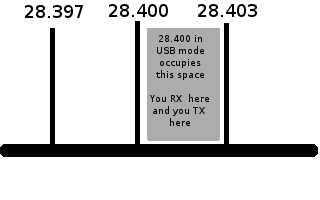
To start with, let’s understand that your dial frequency is where your transmission pass band begins. So if you tune your radio to 28.400 MHz and you are operating in USB mode, a typical width your transmission will occupy is 3kHz. To the right you will see the tuned dial frequency and the indication of the space on the band that your transmission is occupying.
If anyone is within the space of your pass band, you will interfere with them and vice-versa.
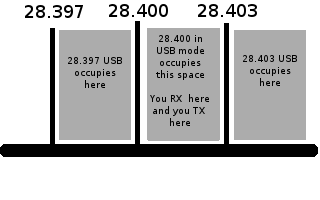
The next point to understand is why there exist gentleman’s agreements as to which mode, USB or LSB is used for a given frequency range. If you stack transmissions next to each other, which is common when the bands are full of operators, it is necessary to keep 3kHz spacing between each ongoing conversation to ensure reasonable copy. By sticking to a common mode, you can more tightly stack these conversations in the spectrum.
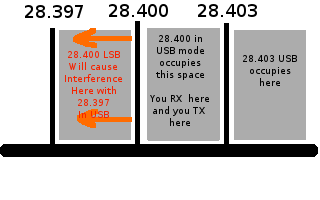
To the right you will see the center frequency of 28.400 and a few others lined up at 3kHz intervals. Each one is in USB mode. The base frequency and the area +3kHz from that point are occupied for each ongoing conversation. If you have an operator come on the band and start to operate using LSB, their conversation will encroach to the ‘left’ going -3kHz. Meaning at 28.400 the conversation in USB actually covers up to 29.403, if it was in LSB it would go down to 28.397.
Normally in all USB operation operators would be at 28.397,28.400, 28.403 and they could all operate freely without interfering with each other. If an operator fires up on 28.400 in LSB, they will be interfering with the operators on 28.397. This makes the use of the band less efficient and more confusing if people mix the modes of operation.
When you are tuning around in SSB, ensure you are in the correct mode for the gentleman’s agreement that applies to the band you are operating on. If you hear any other signals as you are tuning, there are operators occupying that space in the spectrum. Either tune them in and join the conversation, or continue to spin the VFO until you no longer hear any interference. Otherwise you will be interfering with an ongoing QSO, which is plainly, bad operating practice.
Yet one more reminder, there is no such thing as working ‘on frequency’ when in SSB mode. There are no channel assignments, there is only spectrum space. If you are tuned into the zero beat frequency of another operator (if you are, their voice will sound perfectly natural), no matter what your dial is reading, you are both “on frequency”. You can be tuned to 28.3987, as long as you hear no other operators, you are clear to transmit. Any operator joining you should also tune by ear to match you. If you find there are operators at say 28.397, you will notice that you are clear of them in USB mode at 28.400, that is where you should then operate if you don’t want to join them.
This is pretty basic stuff, but a shocking number of amateur operators really have no understanding of these fundamental concepts. I hope this will help explain things clearly for those who are curious.
9/11 Looking Back After A Distance
(2012-09-11) My thoughts on 9/11 after what still feels like only yesterday.11 years later, It still feels like yesterday…

I woke up this morning to hear the discussions over the local ham radio repeaters about 9/11 and it got me thinking about it again. It’s been eleven years now, and it’s hard to even get my head around the fact it has been this long. It feels like just a blink, even now.
The picture to the right is of my old job site on that day. It’s circled in green. I was exceptionally lucky to have a business meeting in mid-town at 1 Penn Plaza that morning, so I wasn’t actually downtown.
The first plane hit while I was still on a commuter ferry, crossing under the Verrazano bridge. I was knocked out asleep and one of the crew woke me up to point it out as we were approaching the Statue Of Liberty in the harbor. Oddly, it was a crystal clear, blue skies fall day…the same weather still brings back the memories.
I remember thinking, “How on a perfectly clear day like this, could anyone possibly hit a building by accident?” I still had no idea it was a jet liner and had been thinking it was a private prop plane. At the distance it just wasn’t clear how bad the damage was. The other thought that crossed my mind was how glad I was that I wasn’t a fireman having to climb all the way up into that high-rise fire. As a volunteer I never liked dealing with simple house fires and I’m sure that I would never be able to go into a high-rise. Those guys have big brass balls.
I put on the FM Walkman I had with me to see if anyone had any word on what was going on. Oddly, my source of news for that day would be the Howard Stern Show. I can still hear that broadcast in parts if I sit and think back on it. It was pretty much the only live stream, particularly on FM, with any sort of real, on the scene, information. People were almost instantly calling in and reporting from the streets and adjoining office buildings.
The ferry dropped us at the 34th St. East-side dock and I started to walk west towards 1 Penn Plaza for the meeting. As I was walking, the report came over about the second plane and at that point I think everybody just froze a bit. It was now evident this wasn’t any sort of accident.
I wound up sitting in a business meeting on the 46th floor. The room had nearly floor to ceiling glass windows looking directly, unobstructed, downtown. The towers were framed pretty much in the center of my view. The manager was sitting with his back to the glass trying to press on with the meeting, while a site manager and I were just shell shocked watching the towers burn. It was surreal.
We weren’t exactly focused on the meeting, as a matter of fact the meeting pretty well went down the toilet and our manager wasn’t very pleased with us either. It’s funny how different people deal with stress and he was just in complete denial of what was going on directly over his shoulders.
I sat and watched as the first tower fell right before my eyes. It felt like I was watching a movie quite frankly. It was slow motion and left my mind just blank, zapped. Too much to process.
I stood up, the site manager and I looked at each other and I said “Hey, good luck getting home, be safe, I’m out of here.”
I’m extremely lucky to have been where I was that day and to have managed the first boat to slip through the quarantine blockade the government was struggling to put in place to keep people from getting home. They kept ordering all the ferries to pull away from the docks, but eventually the captain refused and made a pick up.
The next boats to finally get home were many hours later after the government realized they couldn’t try and contain the information getting out and that people would take extended measures to get home to their families.
That left a really bad taste in my mouth.
There are a ton more details, I could fill many pages with all the small things that filled out that day and what it was like working downtown in the days and years following, but this is the core that lingers. I’m the lucky guy, I’m here, many others aren’t and in their memories I will never forget.
Advrider.com An awesome site for reading motorcycle adventures
(2012-09-03) A site depicting motorcycle adventures, ride reports, equipment reviews and picturesFor anyone into motorcycles and tripping, this site is worth a look
An old friend, this forum comes to mind from time to time and I poke my head back in for a look. I really like dual-sport motorcycle riding and currently own a 2008 Husqvarna TE-610. Unfortunately I’m not that great of a rider, and as a result don’t spend nearly enough time riding. I seem to keep a bike as some sort of place marker for my own sanity more than to actually ride one.
I had a decent wreck years ago that I’ve never fully been able to escape while riding. In the traffic congestion of NJ, it tends to make riding less than enjoyable for me. The old wreck still haunts me. I still can’t really face not having a bike around though…as dumb as it is when I realize how infrequently I ride here. Maybe one day I’ll move somewhere out of the insane traffic here and get to fully enjoy the riding.
The forum is ADVRider.com and the “Ride Reports and Trip Pics” thread is years and years old and continues with daily activity. I highly recommend it to anyone who is even the least bit curious about dual-sport or other forms of endurance riding. You can find something for anyone with the least bit of interest in motorcycles or even adventure travel there.
At least through the forum I can live vicariously through the accounts of others. I hope someone new finds the link and gets as hooked on the accounts as I have been for so long.
byobu, ttytter and other text mode fun
(2012-08-29) Using byobu session manager, ttytter text mode twitter client, and having fun in console modeSometimes a terminal is all you want…
Not sure how I missed byobu or ttytter but I’m glad to have stumbled on them while poking about today.
byobu is an enhancement around the ‘screen’ utility that makes managing multiple windows, vertical and horizontal splits and other functions a lot slicker and requiring a lot less of the three finger contortions that only an emacs user would love. Basically, it allows you to take a single terminal, split it vertically or horizontally into grids of terminals and resize or swap between all of the sessions.
As with screen, you can just drop the ssh connection and your sessions stay intact and running for the next login session. You can, for example, leave an IRC client or something like ttytter (text mode Twitter client) running 24/7 on a shell host. When you log in, you simply reattach the sessions and all is where you left it.
With consoles in linux it is very handy as you can manage a lot more work with this added ability.
ttytter as already mentioned is simply a very functional text mode Twitter client that happens to work very nicely. I’ve stacked up weechat-curses and ttytter now in a nice byobu session that I can just let spin while I’m doing other things.
Very nice and worth a look if you like to keep things in terms whenever possible.
From Tokyo Ham Fair 2012: Icom IC 7100
(2012-08-26) A sneak peak video of the upcoming Icom IC-7100 mobile rigHam Radio Candy for big kids
A video sneak peek from the Tokyo Ham Fair 2012 at the upcoming Icom IC-7100 mobile HF/VHF/UHF radio. No price information has been revealed though, which means it will likely push the gold standard as most Icom models have been lately.
I miss the 706 as a price point right now as my Yaesu FT-857D has completely lost its display and there is nothing else at a reasonable price left in the market as a replacement for it.
I stumbled on this via the KE9V Blog while poking about on Google.
Recent Posts Archive
- 28 Sep 2012 » Understanding the basics of SSB transmission
- 11 Sep 2012 » 9/11 Looking Back After A Distance
- 03 Sep 2012 » Advrider.com An awesome site for reading motorcycle adventures
- 29 Aug 2012 » byobu, ttytter and other text mode fun
- 26 Aug 2012 » From Tokyo Ham Fair 2012: Icom IC 7100
- 22 Aug 2012 » Blacktip sharks chasing a school of Bunker
- 22 Aug 2012 » Adding some new features and functions to the site
- 19 Aug 2012 » Another Site Overhaul
- 26 Jul 2012 » Introducing The New Google Nexus Hard Hat Smart Phone
- 03 Jan 2012 » Five Months Later and Allstate Still Hasn't Settled the Claim
- 04 Nov 2011 » Open Letter to Online Banking Providers
- 30 Oct 2011 » A linux packet radio personal message inbox
- 29 Oct 2011 » Linux soundmodem packet unproto mode tips
- 13 Oct 2011 » QS1R SDR Filtering With Fldigi For PSK And Digi Modes
- 11 Sep 2011 » Dump Allstate - Before it is too late
- 16 Jul 2011 » Some thoughts on Google+ and social media in general
- 27 May 2011 » What is Diaspora? - A basic explanation
- 23 Apr 2011 » The Egg A Plumbers PTT Switch
- 22 Apr 2011 » Happy Easter
- 26 Mar 2011 » Behringer DEQ2496 a pile of lemons
- 09 Mar 2011 » TigerDirect Simply Doesn't Know Their Products
- 04 Mar 2011 » Beware TigerDirect and Biostar selling defective product bundles
- 22 Jan 2011 » OHJRPFNWM - What they don't want you to know.
- 14 Jun 2010 » PayPal Lifetime Spending Limit - "Verified" has huge fraud potential.
- 14 May 2010 » Official Sprint Android 2.1 for Samsung Moment is Out